Coraline and… the yam?
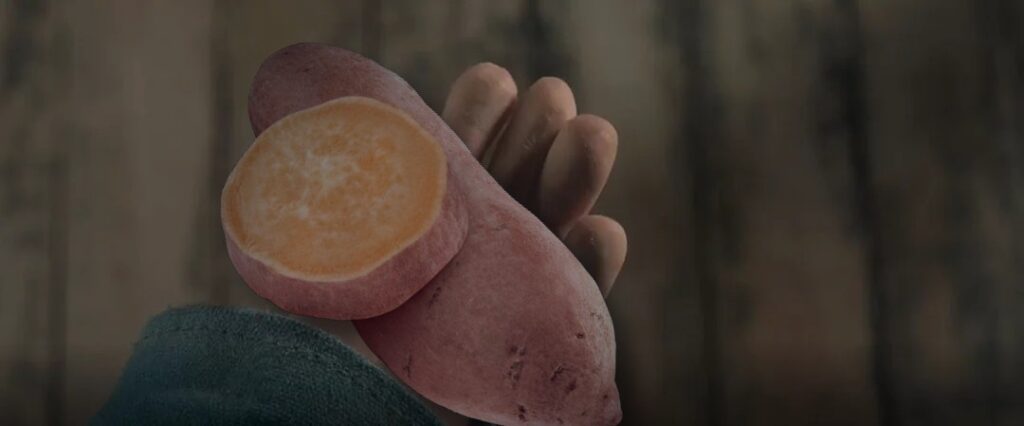
The yam-ification of Coraline, one of my all time favorite movies. I chose this assignment because I am somewhat familiar with photoshopping and editing (shout out to my digital art class!). I was also inspired by the other people who chose to do this assignment as well. Some used the color of a yam in their movie image, some used the word yam in movie posters and others added elements of an image to the yam.
For those of you familiar with the movie Coraline, you may recognize the hand shown in the image above. Coraline and her family are moved into the Pink Palace Apartments with the help of movers. There is a scene where one of the movers stops the door from being closed and he holds his hand out in hopes of receiving payment. It then cuts to him being handed a single dollar. I thought this was the perfect opportunity to add an image of a yam into a movie scene.
In order to create this image I downloaded a picture of a yam from Adobe Stock, got the photo of the hand from the the movie’s IMDb and used Pixlr to put everything together.
To create this image I put each image on a separate layer so I could tweak both on their own if needed. I enlarged the yam to cover the dollar that is originally included in the image. I then played with the filters and effects to darken the yam, add shadows and tried to match the color palette of the film to the best of my ability. I also used the brush tool to add more shadows around the yam to help create seamless transition between the yam and the hand. Considering, I have never used Pixlr before I am pretty proud of how everything turned out. Here is the link to the assignment if you too want to create your own Yam Yarn. Playing around with the photo filters reminded me of the tips I read about last week when it comes to photographs.
One of the tips to becoming a great photographer is playing around with a photos settings. I think this can also be applied when working with any sort of digital media. Many platforms have filters and other visual effects that you can mess around with the adjust certain aspects of images as you please. I used this prior knowledge when I was editing the image above and thought about how I could use it to ‘Expose for Aesthetics’ a tip from David duChem’s 20 ways to make better photographs.
I’ll leave you with this instrumental of a song from Coraline to enjoy.